AI MCP Server Development: Build Custom Model Context Protocol Servers
2025-07-14
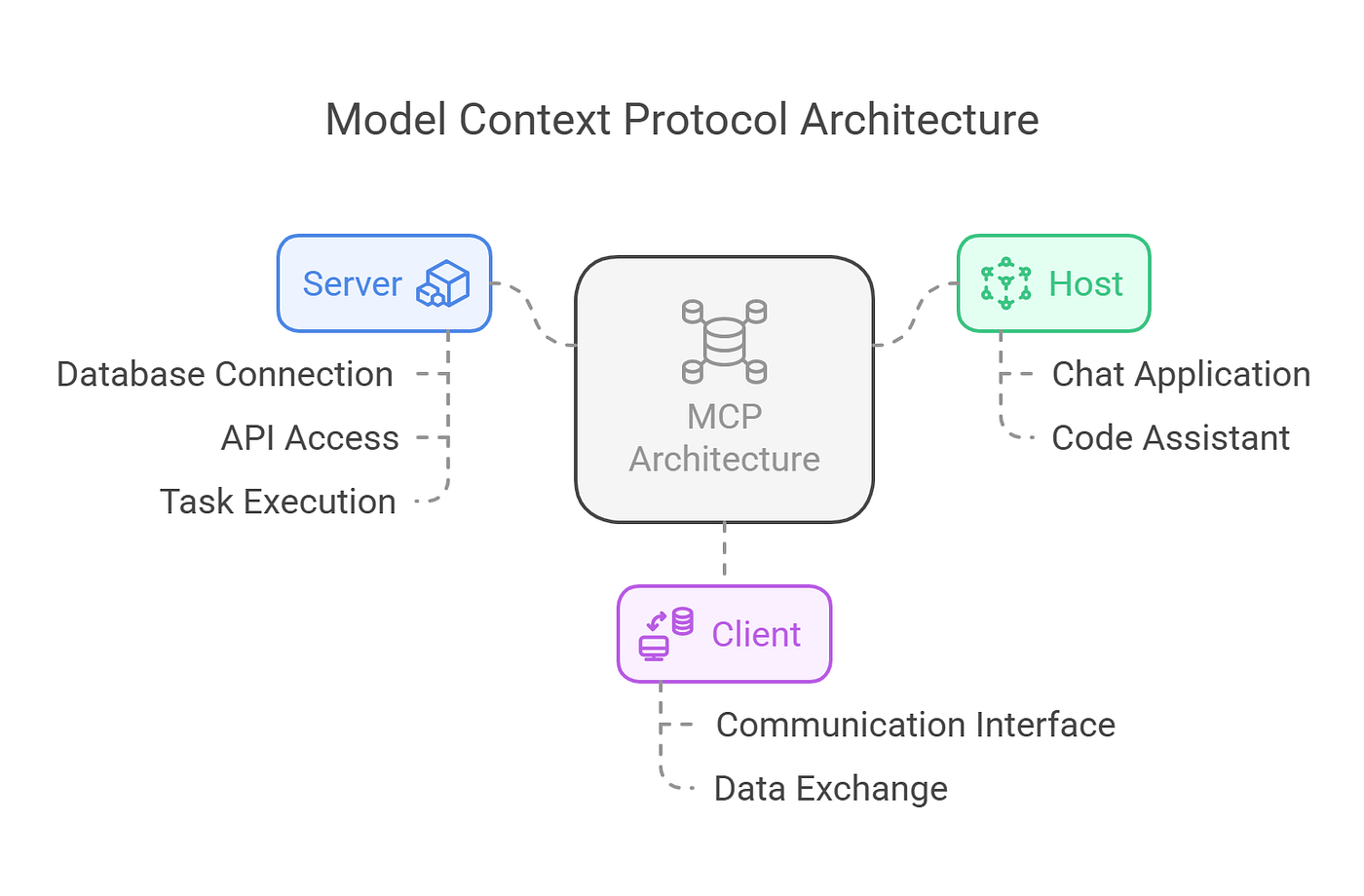
AI MCP Server Development enables developers to create custom integrations that connect large language models with external tools and data sources through the Model Context Protocol. While pre-built servers exist for popular services, building custom servers unlocks the full potential of AI applications tailored to your specific workflows, APIs, and data requirements.
This comprehensive guide walks you through:
✅ Core MCP architecture concepts – Understanding clients, servers, and communication protocols
✅ Python SDK implementation – Building production-ready servers with FastMCP
✅ Tool development workflow – Creating, testing, and deploying custom capabilities
✅ Client integration strategies – Connecting servers to AI applications for real-world use
To understand why custom MCP servers matter, let's examine the challenges developers face when integrating AI with existing systems.
Quick Answer: What Is AI MCP Server Development?
AI MCP Server Development is the process of building custom Model Context Protocol servers that expose tools, resources, and prompts to AI applications, enabling LLMs to interact with external data sources and APIs through a standardized interface. These servers act as bridges between AI models and your specific business logic, databases, or third-party services.
Key capabilities:
- Tool exposure – Define functions that LLMs can call to perform actions
- Resource management – Provide file-like data for AI context
- Prompt templates – Create reusable workflows for complex tasks
- JSON-RPC communication – Language-agnostic protocol for universal compatibility
The Problem: AI Integration Complexity
Developers building AI-powered applications face significant integration challenges:
The core obstacles:
- Fragmented integration approaches – Each AI platform requires custom connectors
- Maintenance overhead – One-off integrations multiply technical debt
- Security concerns – Direct API access from AI models creates vulnerabilities
- Scalability limitations – Bespoke solutions don't scale across multiple tools
- Context management – Providing relevant data to LLMs remains complex
Fragmented Integration Landscape
Before MCP, connecting an LLM to external services required building platform-specific integrations. A database query tool for Claude needed different implementation than the same tool for GPT-4. This fragmentation meant:
- Duplicated development effort across platforms
- Inconsistent behavior between implementations
- Difficult testing and debugging processes
73% of developers report spending significant time on integration work rather than core feature development.
Maintenance and Technical Debt
Each custom integration becomes a maintenance burden. API changes, authentication updates, and error handling require ongoing attention. Organizations with multiple AI integrations face:
- Exponential growth in codebase complexity
- Version compatibility issues across services
- Resource drain on engineering teams
Security and Access Control
Direct API access from AI models creates security risks. Without proper abstraction layers:
- Credentials may be exposed in prompts or logs
- Rate limiting becomes difficult to enforce
- Audit trails are incomplete or missing
60% of organizations cite API vulnerabilities as a top security concern when deploying AI applications.
Scalability Constraints
As AI applications grow, managing dozens or hundreds of tool integrations becomes unmanageable. Traditional approaches struggle with:
- Performance degradation as tool count increases
- Difficulty discovering and organizing available capabilities
- Complex dependency management between tools
The AI MCP Server Solution
The Model Context Protocol addresses these challenges through a standardized, open-source framework. AI MCP Server Development provides a universal language for AI-tool communication, eliminating platform-specific integrations.
Traditional vs. MCP Approach
| Traditional Integration | AI MCP Server Development |
|---|---|
| Platform-specific code for each AI service | Single server works with any MCP client |
| Direct API access from AI models | Secure abstraction layer with controlled access |
| Manual schema definition and validation | Automatic schema generation from Python types |
| Complex error handling across integrations | Standardized error responses via JSON-RPC |
| Difficult to test and debug | Built-in testing tools and inspector utilities |
Core Architecture Components
MCP servers operate on a client-server model where lightweight programs expose specific capabilities to AI applications. The architecture consists of three primary components:
1. Tools: Executable Functions
Tools are functions that LLMs can invoke to perform actions. Examples include:
- Querying databases or APIs
- Reading or writing files
- Executing calculations or transformations
- Triggering workflows or notifications
Tools receive structured input from the LLM and return results that inform the model's next action.
2. Resources: Contextual Data
Resources represent file-like data that clients can read to provide context. This includes:
- API response data
- Document contents
- Configuration files
- Real-time data streams
Resources help LLMs understand the current state of systems or access reference information.
3. Prompts: Workflow Templates
Prompts are pre-defined templates that guide multi-step tasks. They help:
- Standardize complex workflows
- Ensure consistent task execution
- Reduce prompt engineering overhead
- Enable reusable AI patterns
JSON-RPC Communication Protocol
MCP uses JSON-RPC 2.0 for client-server communication. This lightweight, language-agnostic protocol ensures:
- Universal compatibility – Python servers work with TypeScript clients
- Simple message format – JSON-based requests and responses
- Bidirectional communication – Servers can notify clients of state changes
- Error standardization – Consistent error handling across implementations
The protocol's simplicity makes MCP server development accessible while maintaining production-grade reliability.
How to Build an AI MCP Server: Step-by-Step Guide
This section demonstrates building a practical weather server that connects to the National Weather Service API. The server exposes two tools: forecast retrieval and active alert monitoring.
Step 1: Environment Setup
A properly configured development environment is essential. We'll use uv, a fast Python package manager from Astral.
Prerequisites:
- Python 3.10 or higher
- Basic understanding of async/await patterns
- Command-line familiarity
Installation process:
bash# Install uv (macOS/Linux)
curl -LsSf https://astral.sh/uv/install.sh | sh

# Restart terminal, then create project
uv init mcp-weather-server
cd mcp-weather-server

# Set up virtual environment
uv venv
source .venv/bin/activate

# Install dependencies
uv add "mcp[cli]" httpx

# Create server file
touch weather_server.py
The mcp[cli] package includes command-line utilities for testing, while httpx provides async HTTP capabilities for API requests.
Step 2: Server Implementation
Open weather_server.py and build the server in logical sections.
Imports and initialization:
pythonimport httpx
from typing import Any, Dict
from mcp.server.fastmcp import FastMCP

# Initialize FastMCP server
mcp = FastMCP("weather")

# NWS API configuration
NWS_API_BASE = "https://api.weather.gov"
USER_AGENT = "mcp-weather-server/1.0"
The FastMCP class automatically converts Python type hints and docstrings into MCP-compliant tool schemas.
API helper functions:
pythonasync def make_nws_request(url: str) -> Dict[str, Any] | None:
    """Execute NWS API request with error handling."""
    headers = {
        "User-Agent": USER_AGENT,
        "Accept": "application/geo+json"
    }

    async with httpx.AsyncClient() as client:
        try:
            response = await client.get(url, headers=headers, timeout=30.0)
            response.raise_for_status()
            return response.json()
        except httpx.HTTPStatusError as e:
            print(f"HTTP error: {e}")
            return None
        except Exception as e:
            print(f"Request failed: {e}")
            return None

def format_alert(feature: Dict[str, Any]) -> str:
    """Format weather alert into readable text."""
    props = feature.get("properties", {})
    return f"""
Event: {props.get('event', 'Unknown')}
Area: {props.get('areaDesc', 'Unknown')}
Severity: {props.get('severity', 'Unknown')}
Description: {props.get('description', 'No description')}
Instructions: {props.get('instruction', 'None')}
"""
These helpers encapsulate API interaction logic, keeping tool implementations clean and focused.
Step 3: Tool Definition
Define tools using the @mcp.tool() decorator. The MCP SDK automatically generates schemas from function signatures.
Forecast tool:
python@mcp.tool()
async def get_forecast(latitude: float, longitude: float) -> str:
    """
    Retrieve weather forecast for specific coordinates.

    Args:
        latitude: Location latitude (-90 to 90)
        longitude: Location longitude (-180 to 180)
    """
    # Get forecast endpoint for location
    points_url = f"{NWS_API_BASE}/points/{latitude},{longitude}"
    points_data = await make_nws_request(points_url)

    if not points_data:
        return "Unable to fetch location data."

    forecast_url = points_data.get("properties", {}).get("forecast")
    if not forecast_url:
        return "Could not resolve forecast endpoint."

    # Fetch detailed forecast
    forecast_data = await make_nws_request(forecast_url)
    if not forecast_data:
        return "Unable to fetch forecast."

    periods = forecast_data.get("properties", {}).get("periods", [])
    if not periods:
        return "No forecast periods available."

    # Format next 5 periods
    forecasts = [
        f"{period['name']}: {period['detailedForecast']}"
        for period in periods[:5]
    ]

    return "\n\n".join(forecasts)
Alert monitoring tool:
python@mcp.tool()
async def get_alerts(state: str) -> str:
    """
    Retrieve active weather alerts for US state.

    Args:
        state: Two-letter state code (e.g., CA, TX, NY)
    """
    url = f"{NWS_API_BASE}/alerts/active/area/{state.upper()}"
    data = await make_nws_request(url)

    if not data or "features" not in data:
        return "Unable to fetch alerts."

    if not data["features"]:
        return f"No active alerts for {state.upper()}.

    alerts = [format_alert(feature) for feature in data["features"]]
    return "\n\n---\n\n".join(alerts)
Server execution:
pythonif __name__ == "__main__":
    # Start server with stdio transport
    mcp.run(transport='stdio')
The stdio transport is standard for local MCP servers, enabling communication through standard input/output streams.
Step 4: Local Testing
Run the server directly to verify implementation:
bashuv run python weather_server.py
The server starts and waits for client connections. For comprehensive testing, use the MCP Inspector tool:
bashnpx @modelcontextprotocol/inspector uv run python weather_server.py
The inspector provides a web interface for testing tools, viewing schemas, and debugging responses.
Real-World Applications and Use Cases
AI MCP servers enable diverse integration scenarios across industries.
📊 Enterprise Data Integration
Scenario: Connect AI assistants to internal databases and analytics platforms.
Traditional Approach: 2-3 weeks building custom connectors per platform, ongoing maintenance overhead.
MCP Solution: Single server exposes database queries, report generation, and data visualization tools. AI agents can answer business intelligence questions by querying live data.
Key benefits:
- Centralized access control and audit logging
- Consistent query patterns across departments
- Reduced time-to-deployment for new data sources
💼 Customer Support Automation
Scenario: Enable AI agents to access CRM systems, ticketing platforms, and knowledge bases.
Traditional Approach: Separate integrations for each support tool, complex state management.
MCP Solution: Unified server provides tools for ticket creation, customer lookup, and knowledge retrieval. Agents orchestrate multi-step support workflows.
Key benefits:
- Faster resolution times through automated information gathering
- Consistent support quality across channels
- Easy addition of new support tools
📱 Mobile and IoT Integration
Scenario: Connect AI applications to device sensors, location services, and real-time data streams.
Traditional Approach: Platform-specific SDKs, complex authentication flows.
MCP Solution: Lightweight servers expose device capabilities through standardized tools. AI agents can request sensor data, trigger actions, or analyze patterns.
Key benefits:
- Cross-platform compatibility
- Reduced battery and bandwidth consumption
- Simplified permission management
🎯 Development Workflow Automation
Scenario: AI-assisted code review, testing, and deployment.
Traditional Approach: Manual tool invocation, context switching between platforms.
MCP Solution: Servers integrate with Git, CI/CD pipelines, and testing frameworks. AI agents can analyze code, run tests, and suggest improvements.
Key benefits:
- Faster development cycles
- Consistent code quality standards
- Reduced cognitive load on developers
Connecting Servers to AI Clients
Once built, MCP servers require clients to facilitate LLM interaction. While local clients like Claude Desktop work well for development, production deployments benefit from more flexible solutions.

Client Options and Considerations
Local clients (Claude Desktop, Cursor):
- Require configuration file setup
- Limited to stdio transport
- Best for development and testing
- Single-user access
Remote clients (Jenova, custom implementations):
- Support HTTP/SSE transports
- Enable multi-user access
- Require deployment infrastructure
- Production-ready scalability
Jenova: Purpose-Built MCP Client
Jenova is the first AI agent platform designed specifically for the MCP ecosystem. It excels at connecting to remote servers and orchestrating complex, multi-tool workflows.
Key capabilities:
- Remote server support – Connect to deployed MCP servers without local configuration
- Multi-agent architecture – Scale to hundreds of tools without performance degradation
- Agentic workflows – Intelligently chain tools to accomplish complex goals
- Cross-platform availability – Desktop, iOS, and Android apps
- Model flexibility – Works with GPT, Claude, Gemini, and other leading models
Example workflow:
- User asks: "Find the best laptop deals under $1000 and summarize them"
- Jenova invokes product search MCP server
- Results are passed to summarization MCP server
- Final summary is formatted and delivered
This multi-step orchestration happens automatically, with Jenova managing tool selection, error handling, and result aggregation.
Deployment Strategies
For production use, deploy servers to cloud infrastructure:
Deployment options:
- Serverless platforms (AWS Lambda, Cloudflare Workers) – Cost-effective for variable load
- Container services (ECS, Cloud Run) – Better for stateful servers
- Virtual machines – Maximum control and customization
Security considerations:
- Implement authentication (API keys, OAuth)
- Use HTTPS for all communications
- Rate limit requests to prevent abuse
- Log all tool invocations for audit trails
For detailed deployment guidance, see Speakeasy's remote MCP server guide.
Frequently Asked Questions
Is AI MCP Server Development free?
The Model Context Protocol is open-source and free to use. The official Python SDK is available under the MIT license. However, deployment costs (cloud hosting, API usage) and client access may vary. Jenova offers free tier access to MCP capabilities with usage limits, and paid plans for higher volume needs.
How does MCP compare to function calling APIs?
MCP provides a standardized protocol that works across any AI model or platform, while function calling APIs are typically model-specific. MCP servers can expose tools to multiple clients simultaneously, reducing integration overhead. The protocol also supports resources and prompts beyond simple function calls, enabling richer AI interactions.
Can I use MCP servers with any AI model?
Yes, as long as the client application supports MCP. The protocol is model-agnostic—servers work with GPT, Claude, Gemini, or any other LLM. Jenova supports multiple model providers, letting you choose the best model for each task while using the same MCP servers.
Do I need programming experience to use MCP servers?
Building servers requires Python or TypeScript knowledge. However, using existing servers through clients like Jenova requires no coding. Non-technical users can access MCP tools through natural language interfaces on desktop and mobile devices.
How do I secure my MCP server?
Implement authentication at the transport layer (API keys for HTTP servers). Use environment variables for sensitive credentials. Apply rate limiting to prevent abuse. For production deployments, consider using a reverse proxy (nginx, Cloudflare) for additional security layers. The MCP security documentation provides detailed guidance.
Can MCP servers handle real-time data?
Yes, MCP supports server-sent events (SSE) for real-time updates. Servers can push notifications to clients when data changes, enabling live dashboards, monitoring tools, and streaming applications. The protocol's bidirectional communication makes it suitable for interactive, real-time use cases.
Conclusion: Building the Future of AI Integration
AI MCP Server Development represents a fundamental shift in how we connect AI models to external systems. By providing a standardized protocol, MCP eliminates fragmented integrations and enables developers to build once, deploy everywhere.
The process—environment setup, tool definition, testing, and deployment—is streamlined by official SDKs that handle protocol complexity. Starting with a simple server like the weather example in this guide provides the foundation for more sophisticated integrations.
As the ecosystem matures, platforms like Jenova are making MCP accessible beyond developers, bringing AI-powered workflows to everyday users through intuitive interfaces and intelligent tool orchestration. Whether you're building internal tools, customer-facing applications, or experimental prototypes, MCP provides the infrastructure for scalable, secure, and context-aware AI integration.
Start building your first MCP server today and join the growing community shaping the future of AI-tool interaction.
Sources
- Model Context Protocol - Build an MCP Server – Official documentation and quickstart guide
- Speakeasy - Deploying Remote MCP Servers – Production deployment strategies
- Stack Overflow Developer Survey 2023 – Developer AI integration challenges
- IBM Cost of a Data Breach Report – API security concerns
- National Weather Service API Documentation – Weather data source reference